For families on the way up
A better day, every day.
The family command center for your home. Kids learn responsibility for their own routines, learn the value of work and a tidy home, and earn the stars to prove it. You stay involved in their day, even when work takes you away.
14 days free, no card
Try everything for two weeks. No credit card, no commitment, set up in two minutes.
See pricing →Built for parents who work away
Watch the morning happen from anywhere, and be there at bedtime with a goodnight video.
How it helps →No phone needed for kids
A shared family tablet where kids message only Mom, Dad and the relatives you invite.
Compare to a phone →Military families save 20%
Active duty, Guard, Reserve, veterans and spouses save 20%, always. It stacks with a friend’s link.
Ways to save →Raise kids who own their day
Upward turns “did you make your bed?” into routines kids run themselves. A little every day adds up to responsible, capable kids, and a calmer home.
The value of work
Morning, after-school and bedtime routines with a deadline to beat. Kids check things off on their own and learn that a clean room and a helping hand are part of being a family.
Healthy habits
Reading, practice, time outside, Bible reading and family devotionals, with weekly goals and streaks. The good stuff becomes a habit, not a battle.
Fun that motivates
Stars for beating the clock, streaks for keeping it up, and family Bucks they spend on real rewards you choose: movie night, a hike with Dad, dinner their way.
Everything worth growing in
Home
Routines with deadlines, plus jobs like feeding the dog.
Body
Exercise, sports practice and time outdoors.
Faith
A Bible chapter a day, devotionals and family prayer.
Learning
Reading, instrument practice and homework time.
Family
Notes, photos and videos with parents and relatives.
A day with Upward
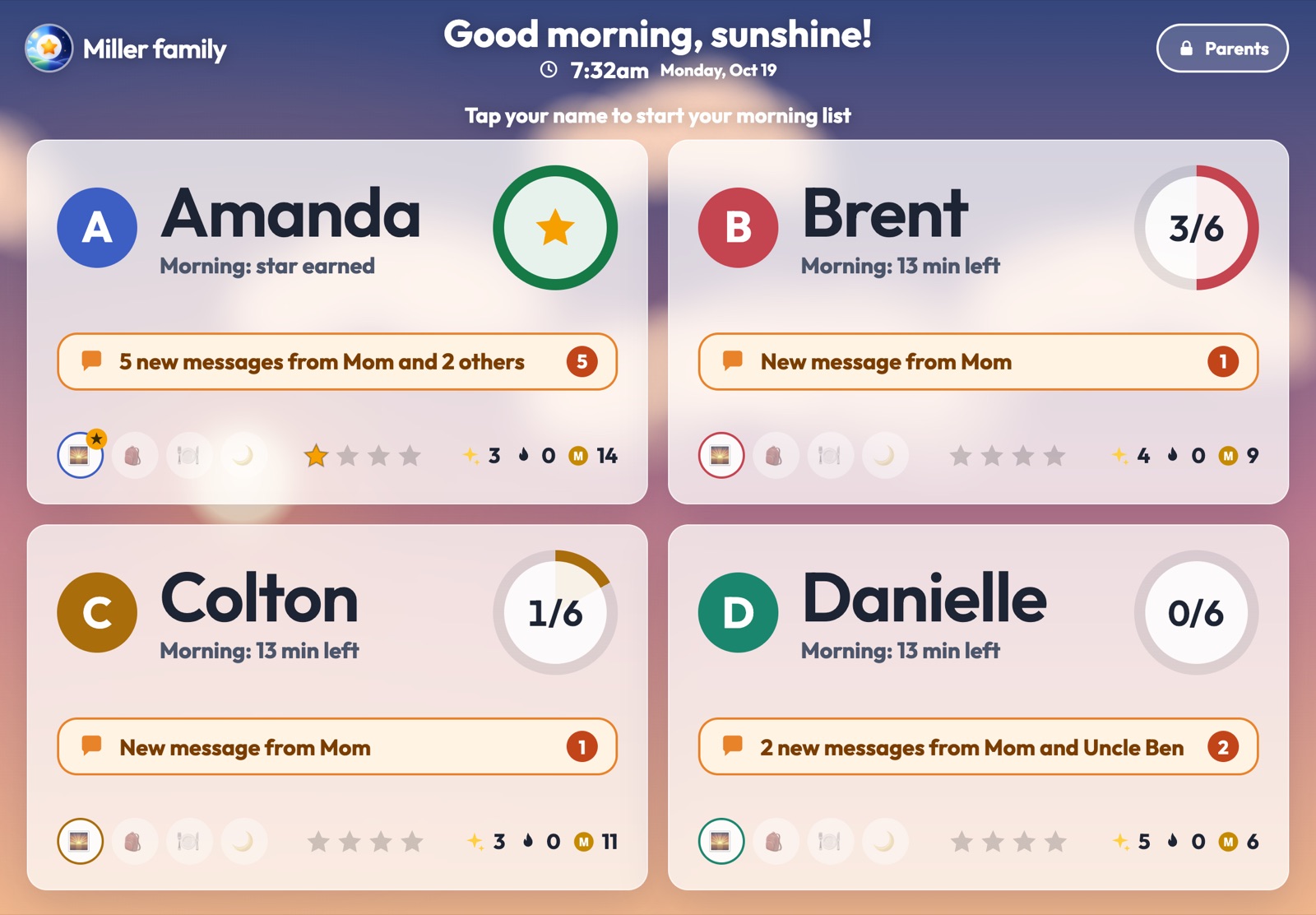
Everything below is the actual app, shown with a sample family, the Millers.
7:30am
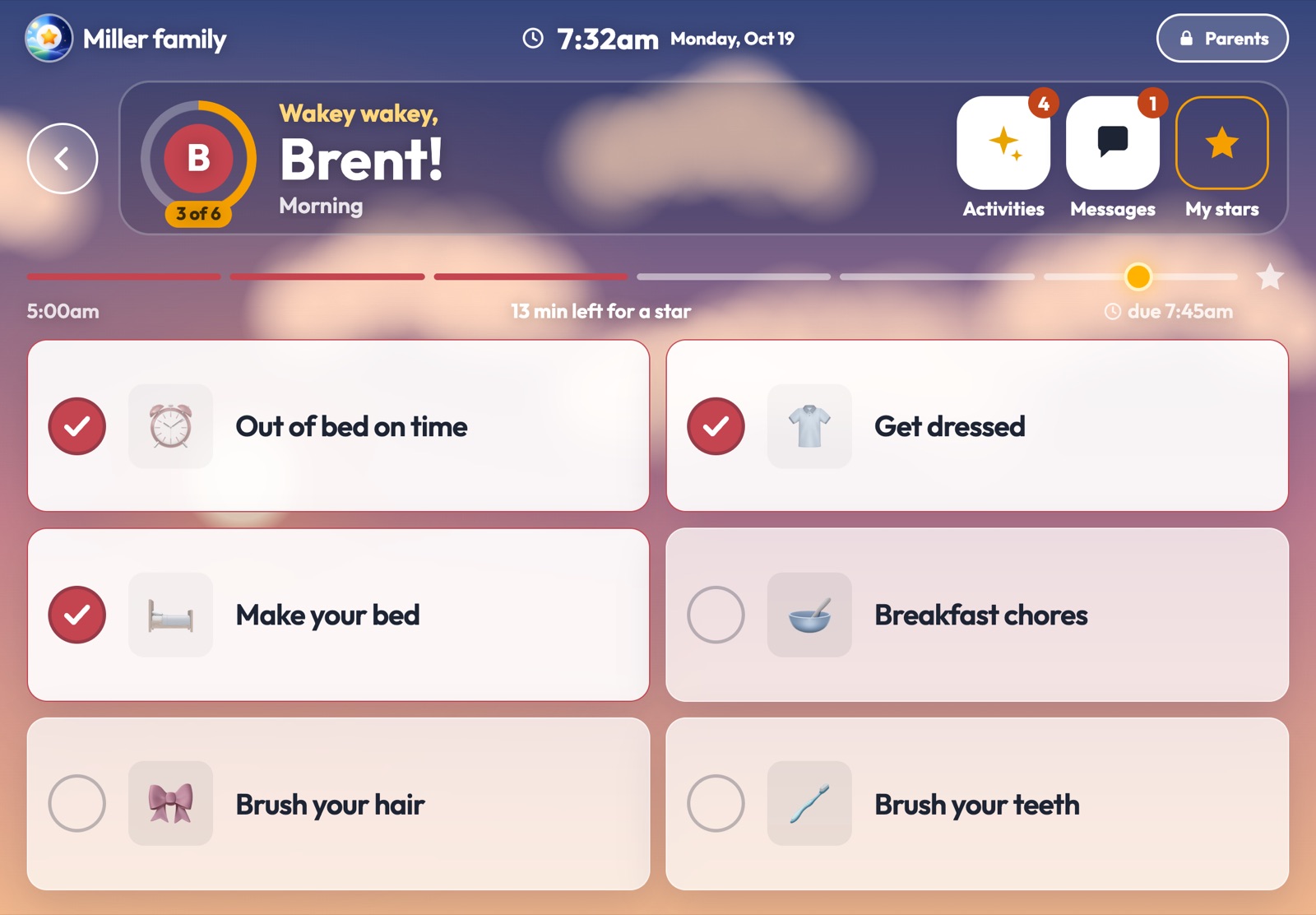
Tap your name. Beat the clock.
Each kid sees just their own routine, in big friendly tiles. A timer counts down to the star deadline, so nobody has to nag.
- No sign-in for kids. The tablet just knows the family.
- The right routine shows up at the right time of day.
- Missed the bus? They can still finish later, for credit.
The payoff
Stars, streaks and family Bucks
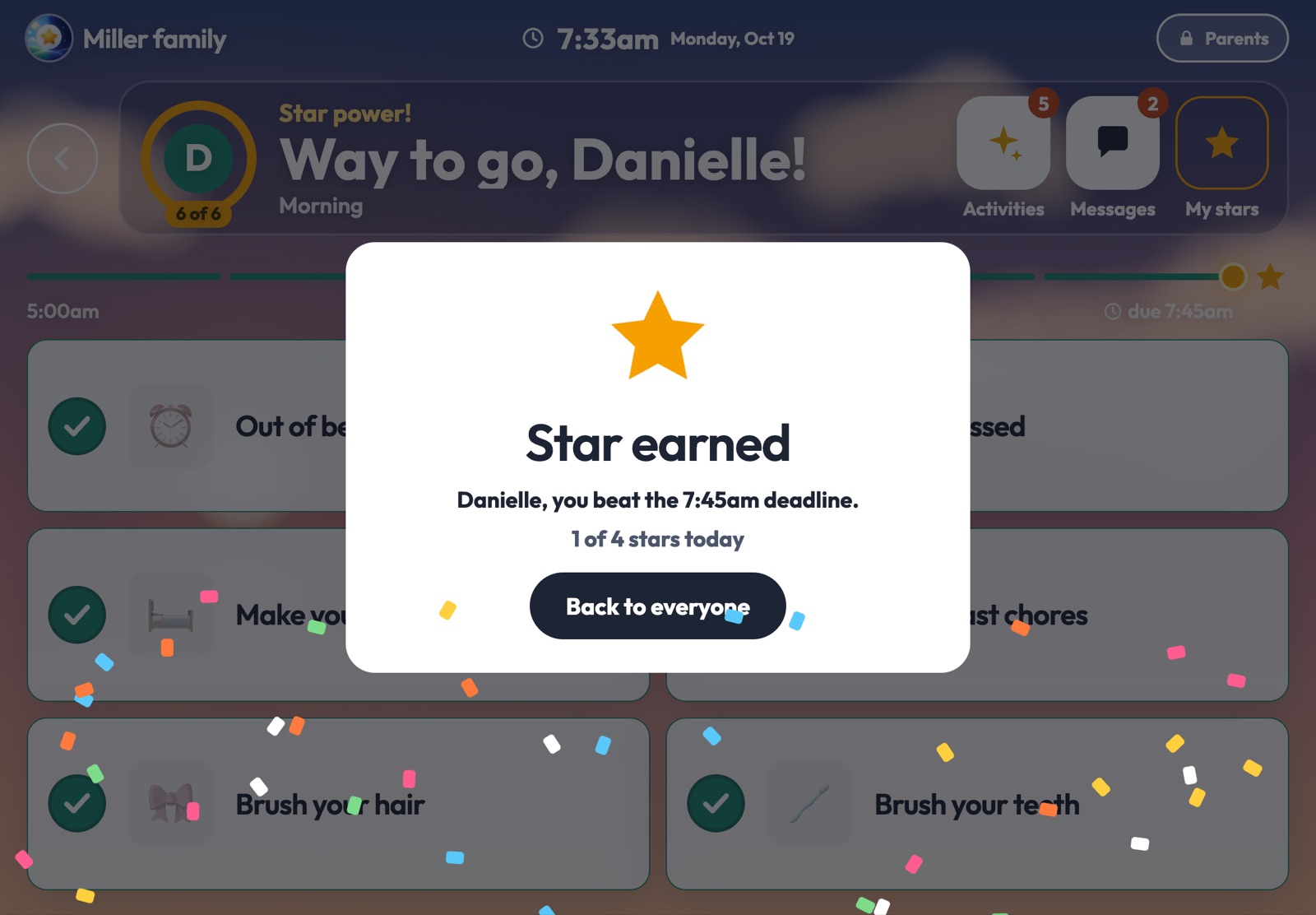
Finish a routine before its deadline and the star is theirs, with confetti. A star on every routine that day earns one family Buck, named after your family: Miller Bucks, Garcia Bucks, yours.
- Bucks buy real things from your reward shop: movie night, a hike with Dad.
- Early Bird notes, personal bests and perfect-day streaks.
- Finished late for a good reason? Parents can give the star anyway.
Beyond chores
The habits that matter most
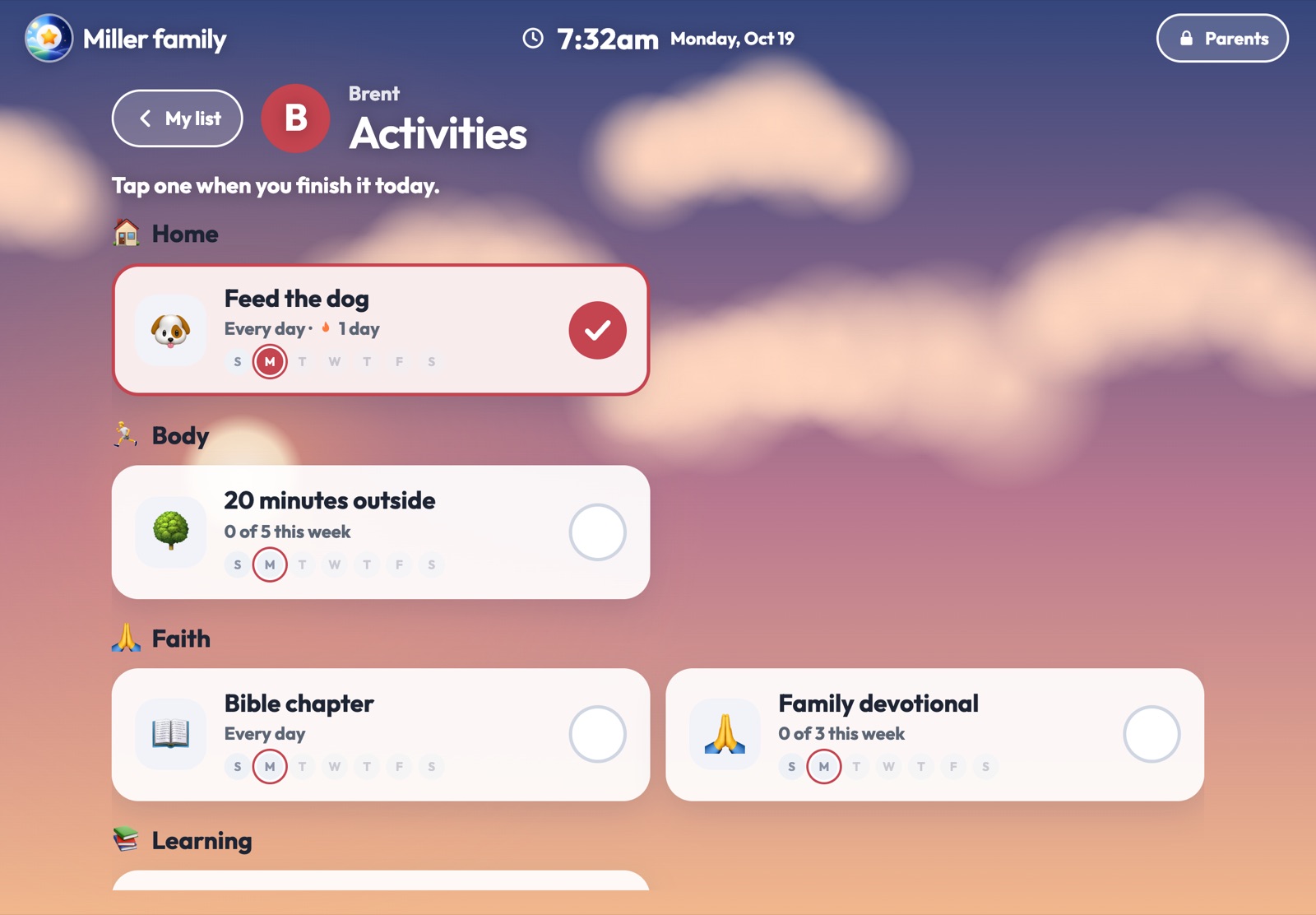
Bible reading, a family devotional, time outside, practice, reading. Kids tap them done when they finish. No Bucks here, just weekly goals and streaks they can be proud of.
- Every day, or a weekly goal like "5 days a week."
- Grouped into Home, Body, Faith and Learning.
- Parents see the whole week at a glance.
All day
A safe little messenger
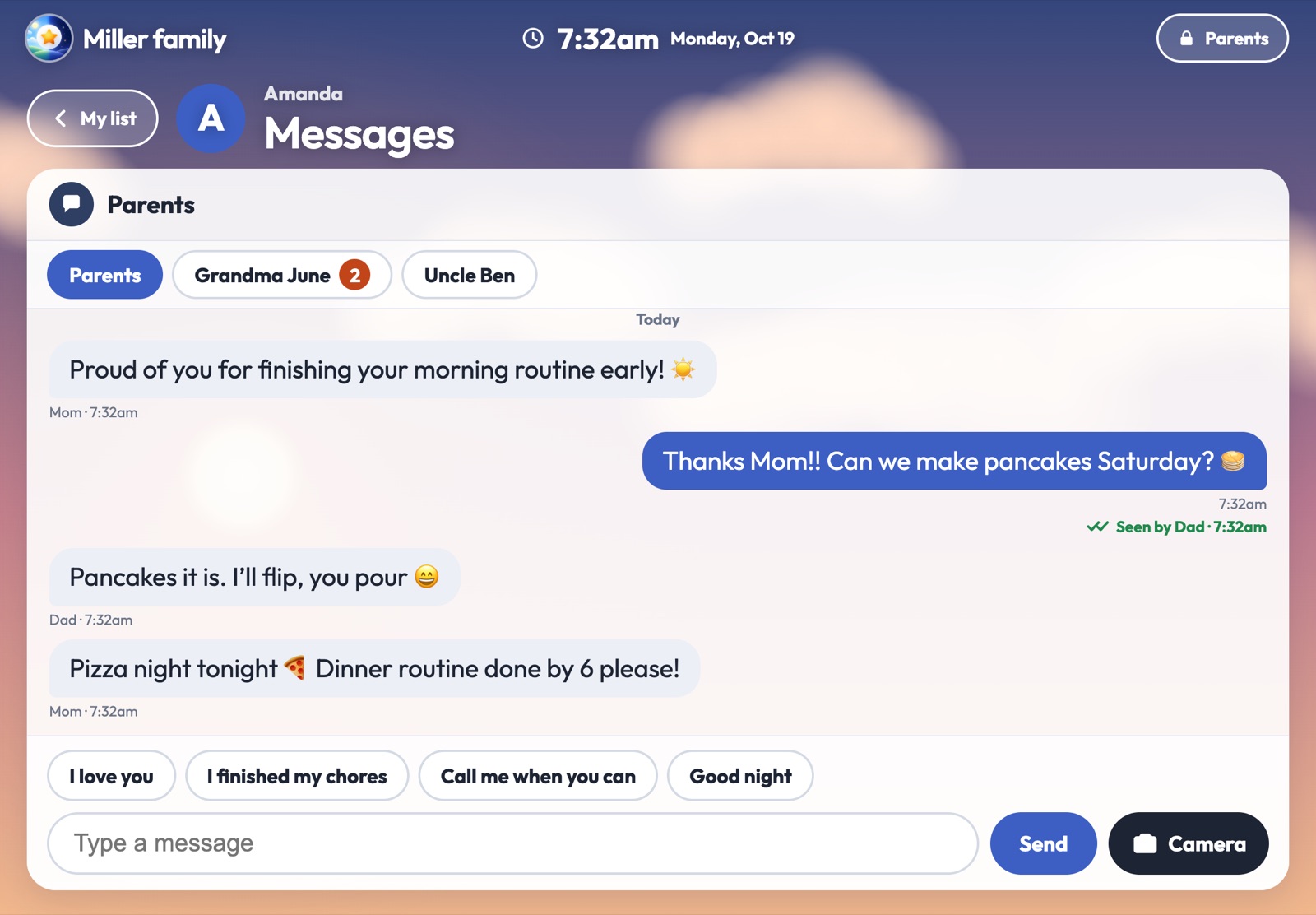
Kids write to Mom and Dad, and to the relatives you invite. Nobody else. Every message says who wrote it, and kids see when it's been read.
- Text, photos and short videos from the tablet camera. Grown-ups can also send files, like a permission slip or a recipe.
- Messages arrive in about a second, with a gentle ding.
- Quick replies like "I love you" for little ones still learning to type.
For Mom and Dad
Run it from your pocket
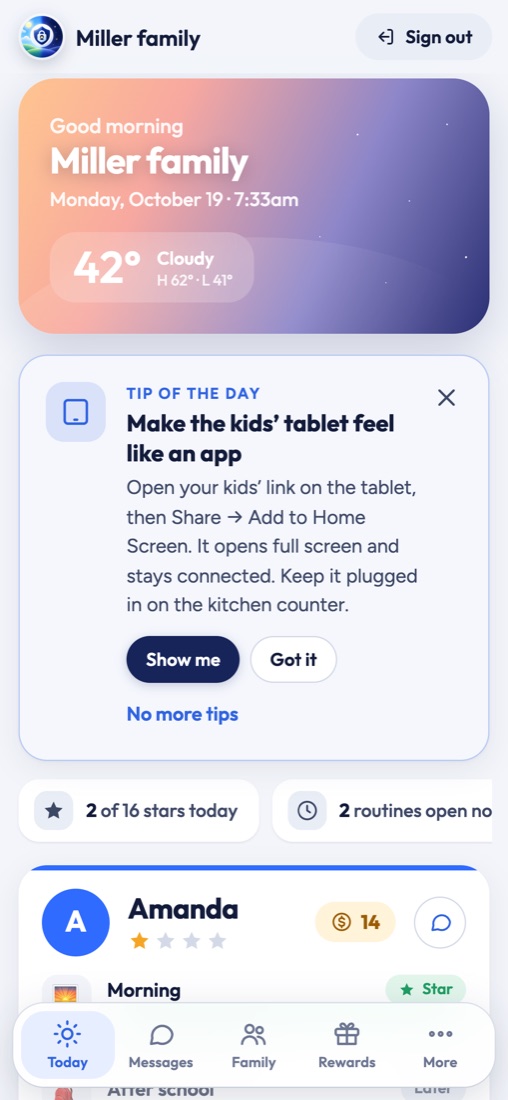
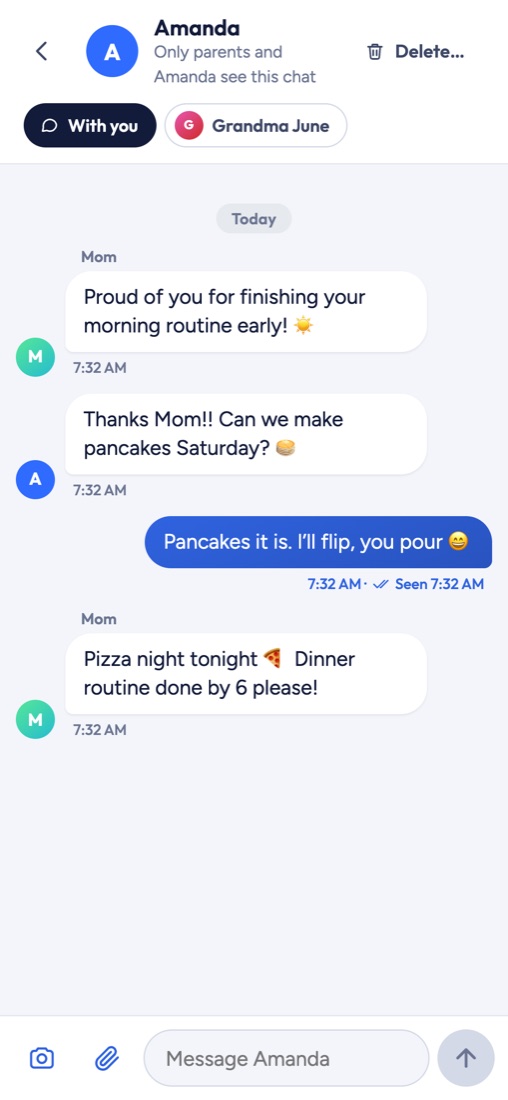
Each parent gets the app on their own phone with their own PIN. See who's done, who's running late, and answer messages from work or the car line.
- Mom and Dad each sign in, so kids know who wrote.
- Phone alerts when a kid writes to you.
- Change a chore, and the tablet updates instantly.
Near or far
Grandma is one tap away
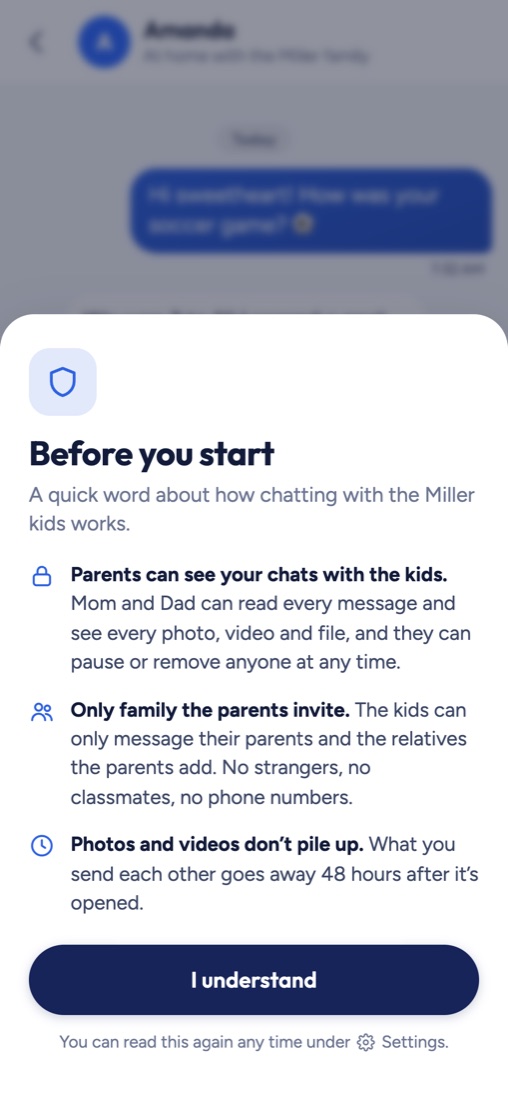
Invite grandparents, aunts, uncles or a parent who's deployed. They get a simple app of their own and a private chat with each child.
- You invite them with a code. No one else can reach your kids.
- Parents can read along, pause or remove anyone.
- Photos and videos with relatives clean themselves up 48 hours after they're opened. With Mom and Dad, they're kept.
When a parent is away
Home, even when you’re not.
For deployed service members, parents who travel for work, rotation and shift workers, pilots, truckers and traveling nurses, The Upward Family keeps you in the middle of your kids’ day, wherever you are.
- Watch the morning happen. See routines get checked off and stars earned, live, on your phone.
- Be there at bedtime. Record a goodnight video that’s waiting on the kitchen tablet when they wake up.
- Cheer from anywhere. Add a bonus Buck, approve a reward, or give the star for a routine finished late, then send a quick note so they know it was you.
- Keep every moment. Photos and videos between you and your kids are kept, so the messages from a long deployment are still there when you come home.
- Your own sign-in. Each parent has their own account and PIN, so the kids always know which of you wrote.
Routines
Built around your day, not ours
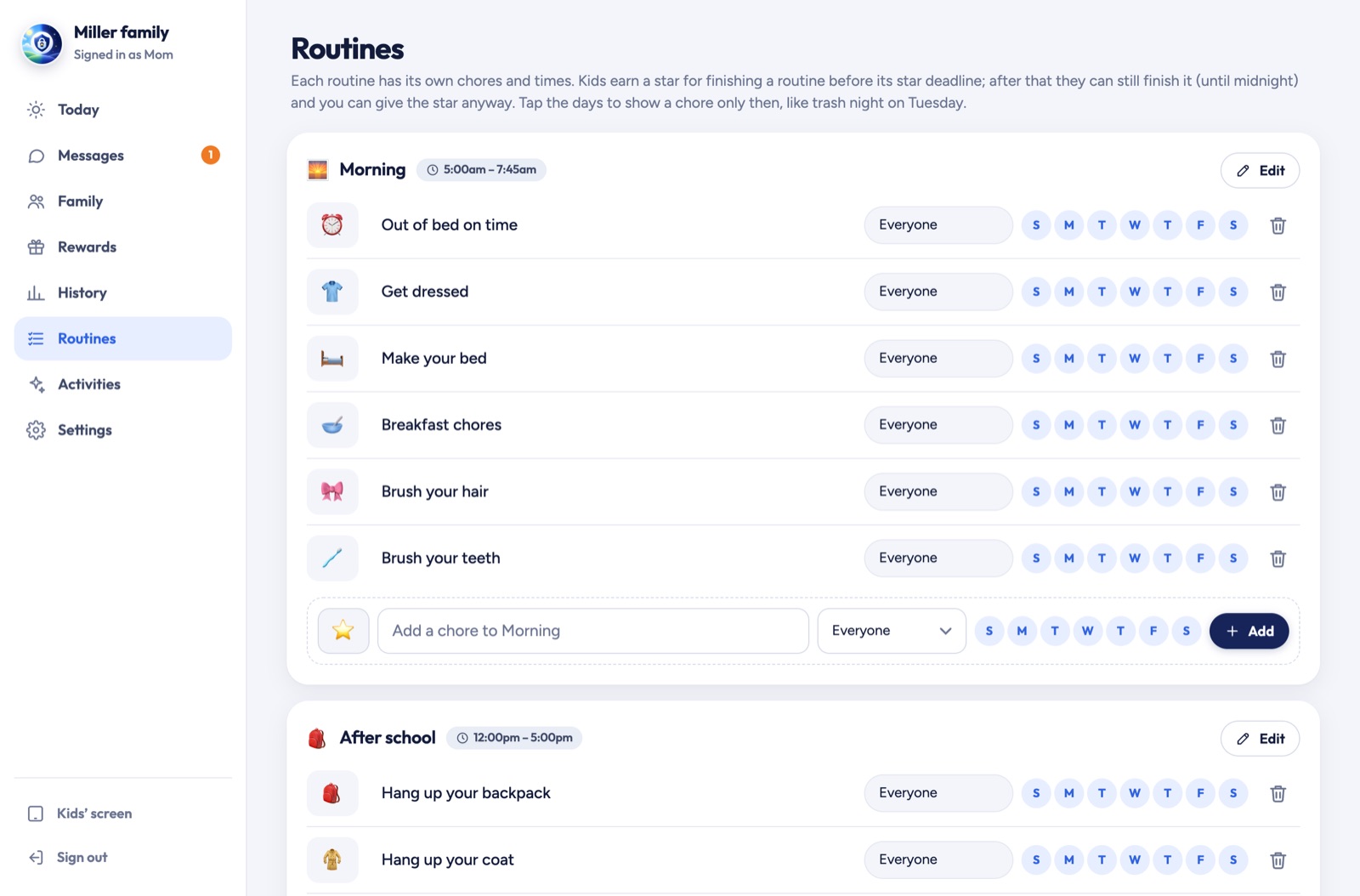
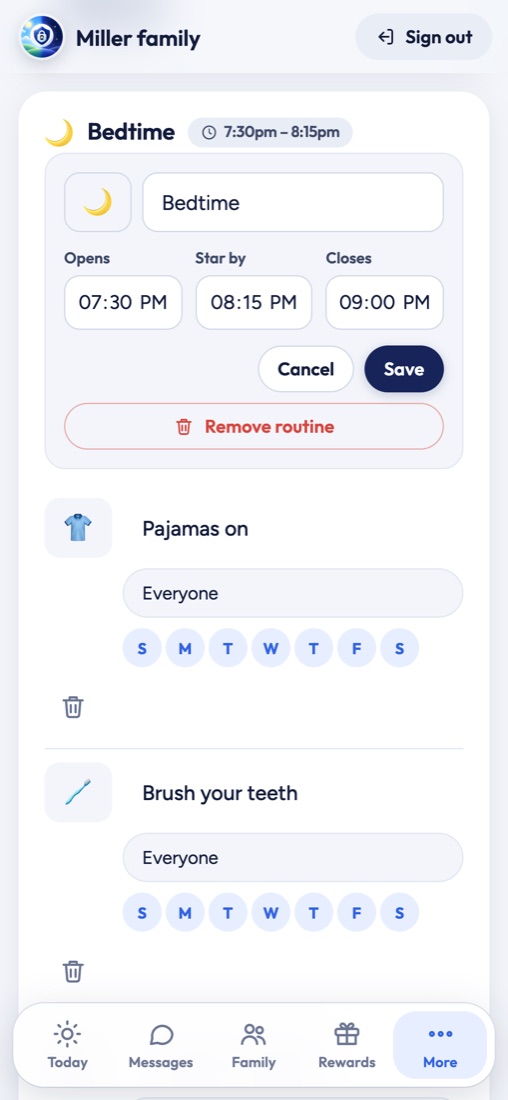
Start with Morning, After school and Dinner, then make them yours. Add Bedtime, Practice or Saturday jobs. Name them, pick an emoji, and set when each one opens, when the star is due, and when it closes.
- Chores for everyone, or for one child.
- Only on certain days: trash night on Tuesday, piano on Monday, Wednesday and Friday.
- Routines can overlap. Kids see the newest one first, and can still finish the other.
For parents
The whole family at a glance
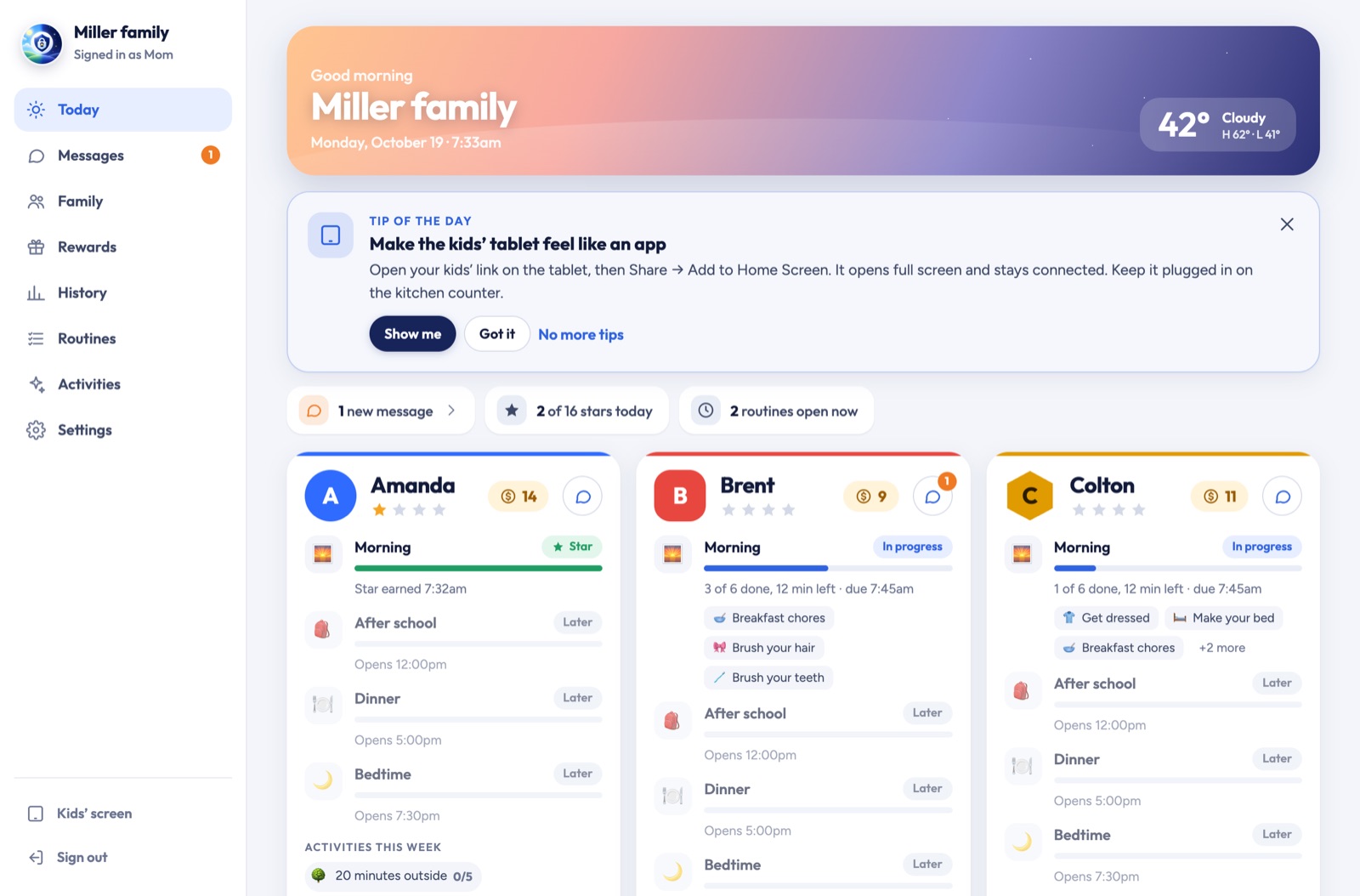
Open the parents' app on your phone or laptop and see every kid, every routine and every star, live. Approve reward requests, hand out bonus Bucks and answer messages in one place.
- Mom and Dad each have their own sign-in and PIN.
- History shows two weeks of stars, plus who approved or changed what.
- Delete a single message, a whole conversation, or everything.
Grandparents, aunts, uncles and cousins
Bring the whole family closer
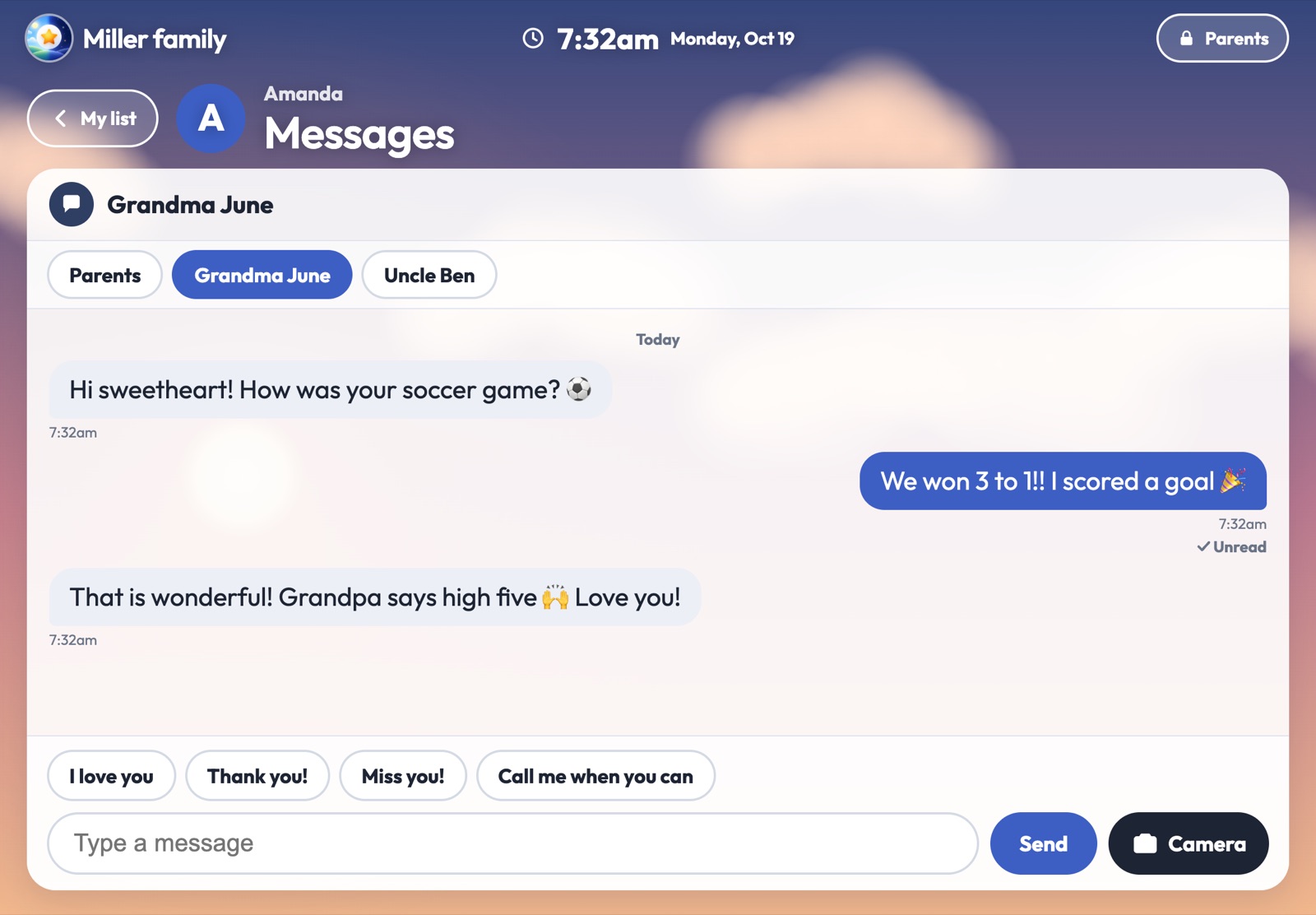
Invite the relatives your kids love. They get a simple app of their own and a private chat with each child, so Grandma can ask about the soccer game and Uncle Ben can send a birthday video, from anywhere.
You hold the guest list: relatives join only with your invitation, they’re told up front that parents can see their chats, and you can pause or remove anyone at any time.
Not ready for a phone?
Stay close without handing them a phone
A first phone opens the door to everyone. Upward is a family app, not a phone: your kids can message the people you choose, and nobody else.
Thoughtful, down to the details
A sky that matches outside
Sunrise pinks in the morning, stars at night, rain when it's raining. Kids notice.
Works when Wi-Fi blinks
Taps are saved on the tablet and sent the moment the connection is back.
Late still counts
Breakfast chores slipped? Kids can finish after school, and you decide if the star is earned.
Read receipts
"Seen by Dad" and "Unread" on every message, so kids know they were heard.
Private by design
Kids can only message parents and family you invite. No ads, no strangers, no public profiles.
No app store needed
Open a link and add it to the Home Screen on any tablet or phone. It stays signed in.
One simple plan for the whole family
Every feature, every kid, both parents and all the relatives you invite.
- Routines, stars, Bucks and rewards for every kid, however many you have
- Activities and healthy habits with weekly goals
- Parents’ app for Mom and Dad, from anywhere
- Family chat with photos, videos and files, including relatives
No card needed to start.
Ways to save
Give it to someone you love
Give a family a better day
A gift of Upward is more than an app. It’s calmer mornings and a tidier home, kids who build healthy habits and love earning their stars, a parent who works away who still gets to be part of every day, and grandparents who are one tap away. Gift memberships are 20% off.
Already using Upward? Share your link from Settings: the family you invite gets 20% off their first year, and you save 20% at renewal.

Questions families ask
What do we need to get started?
A tablet for the kitchen counter (an iPad or any tablet with a modern browser) and the parents’ phones. Sign up in about two minutes, open your kids’ link on the tablet, and add it to the Home Screen. There’s nothing to download from an app store.
How does the free trial work?
Your first 14 days are free, with every feature and no card needed. After that, choose $10 a month or $100 a year to keep going.
Does it work when a parent is deployed or traveling?
Yes. The parents’ app works on any phone with internet, anywhere in the world. You’ll see routines and stars as they happen at home, and you can send messages, photos and videos that are waiting on the family tablet. Times always follow your family’s home time zone.
Do my kids need an account or email?
No. The kitchen tablet is connected to your family once, and kids just tap their name. Each parent signs in with the family code and their own 4-digit PIN.
How do stars and Bucks work?
Each routine finished before its star deadline earns a star. A star on every routine that has chores that day earns one family Buck. Kids spend Bucks in a reward shop you set up, and you approve each request.
Can we change the routines?
Yes. Rename them, change their times, add new ones like Bedtime, or remove one you don’t need. Chores can be for everyone or one child, every day or only certain days.
Who can message my children?
Only Mom, Dad and the relatives you invite with a code. Parents can read every conversation, pause or remove a relative, and delete messages at any time.
Is this a replacement for a phone?
For many families, yes. Kids can message their parents and the relatives you invite, send photos and short videos, and see their routines, all on a shared family tablet. There’s no phone number, no social media, no browser and no app store.
Do you offer a military discount?
Yes. Active duty, Guard, Reserve, veterans and military spouses get 20% off, always, on the honor system: just tick the box when you sign up. It stacks with a friend’s 20% share-link discount on your first year.
Can I give it as a gift?
Yes. Give a 6-month or 1-year membership to a family you love, at 20% off.
Start your family today.
Two minutes to set up. 14 days free, no card needed.
Start free for 14 days